Want to mount a TV, but can’t find any studs in the wall? Don’t worry — toggle bolts are your best friend. They’re one of the strongest drywall anchors available, and when used properly, they can safely hold even large TVs on hollow walls. In this guide, you’ll learn how to mount a TV using toggle bolts step by step, plus tips for safety and durability.
- What Are Toggle Bolts and How They Work
- When You Should (and Shouldn’t) Use Toggle Bolts
- Tools and Materials Needed
- Step-by-Step Guide
- How Much Weight Can Toggle Bolts Hold?
- Tips for a Safe and Long-Lasting Installation
- Conclusion
What Are Toggle Bolts and How They Work
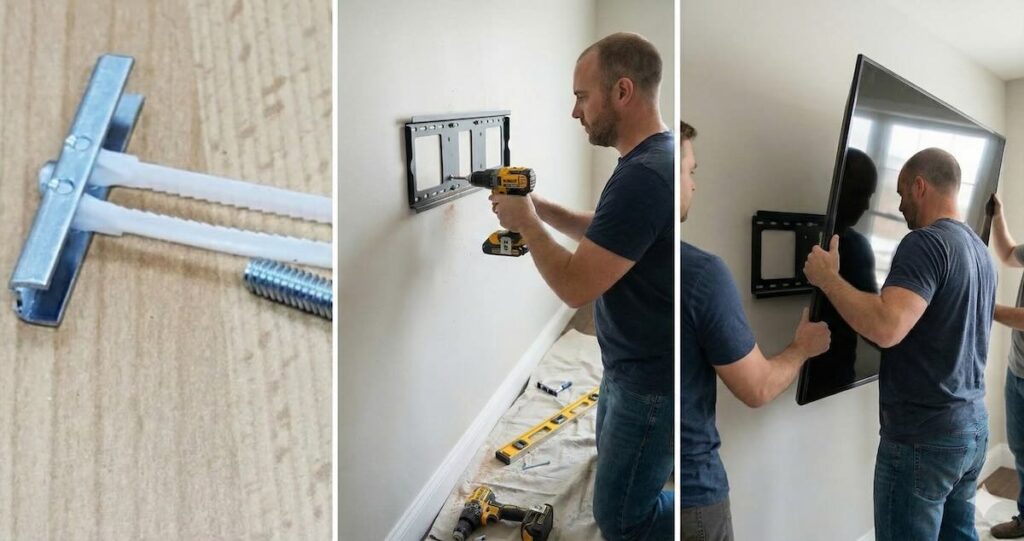
Toggle bolts are a type of drywall anchor designed to grip the inside of a hollow wall. They consist of a long machine screw and a spring-loaded “wing” that folds to pass through a hole, then expands behind the drywall to distribute weight over a large area.
Unlike regular plastic anchors, toggle bolts can hold significantly more weight because they brace against the inside of the wall. They’re commonly used when:
- There are no wall studs in the ideal mounting location
- The wall is made of drywall or hollow plasterboard
- You want a secure hold without cutting open the wall
There are also modern versions like snap toggles (with metal channels), which work similarly but are easier to install. This article focuses on classic toggle bolts, which are still widely used and highly reliable.
When You Should (and Shouldn’t) Use Toggle Bolts
Toggle bolts are perfect for mounting a TV when wall studs aren’t available — but they’re not ideal in every situation. Here’s when they make sense, and when it’s better to look for other options:
✅ Use Toggle Bolts When:
- You want to mount a TV on drywall or plasterboard without cutting into the wall
- There are no studs where you want the TV to go
- The TV is under 100 pounds and you’re using a low-profile or tilt mount
- You want a clean, professional look without exposing extra framing
⛔ Avoid Toggle Bolts If:
- You’re mounting on a wall that already has significant damage or soft spots
- The wall is made of thin or weak drywall (less than 1/2 inch thick)
- You’re using a full-motion mount with heavy torque and extension arms (these should be anchored into studs)
- You’re uncomfortable making large holes (toggle bolts require bigger holes than regular anchors)
Toggle bolts are a solid solution — but only when used correctly and within their rated limits. Let’s move on to what you’ll need to install them safely.
Tools and Materials Needed
Before starting, make sure you have the right tools and hardware. Toggle bolts can support a TV safely — but only if installed with precision and care.
Required Tools:
- 🛠️ Power drill with variable speed
- 🌀 Large drill bit (usually 1/2” or 5/8”) to match toggle size
- 📏 Level and measuring tape
- ✏️ Pencil or painter’s tape to mark hole locations
- 🔧 Screwdriver or socket wrench
- 🧤 Safety goggles and dust mask
Materials:
- Toggle bolts rated for at least 50–100 lbs each (4 to 6 recommended)
- Wall mount bracket compatible with your TV size and VESA pattern
- Mounting screws (often included with the TV mount)
Once you’ve gathered everything, you’re ready to start marking, drilling, and mounting — the safe way.
Step-by-Step Guide: Mounting a TV with Toggle Bolts
Installing a TV with toggle bolts requires a careful approach — especially since you won’t be anchoring into studs. Follow these steps for a safe and sturdy result:
Step 1: Plan and Mark the Hole Locations

- Hold the wall plate of the TV mount against the wall in your desired location. Use a level to make sure it’s perfectly horizontal.
- Mark all the mounting hole positions with a pencil through the bracket’s holes.
- Tip: Place a piece of painter’s tape over the area before marking — it helps avoid crumbling and keeps pencil marks visible on textured drywall.
- Double-check measurements to make sure your TV will be centered and at the correct height before drilling.
Step 2: Drill Oversized Holes for the Toggle Bolts

- Use a drill bit that matches the folded width of your toggle bolts (typically 1/2” to 5/8”).
- Drill slowly and cleanly through the drywall — these holes will need to be slightly larger than the screw to allow the toggle wings to pass through.
- Be careful not to drill too deep or push too hard. Stop as soon as you’re through the drywall panel.
- Clean the holes with a vacuum or cloth to remove dust before inserting the bolts.
Step 3: Insert Toggle Bolts Through the Wall Plate

- Attach the toggle bolt to the screw through the wall plate hole — the spring-loaded “wings” should be folded tightly against the bolt.
- Push the toggle through the drywall hole until the wings open behind the wall. You should hear a soft “click” or feel resistance once they expand.
- Gently pull the bolt toward you to hold the wings against the inside of the drywall while you begin tightening the screw.
- Do not overtighten! Just snug enough to keep the bracket flush against the wall without damaging the drywall surface.
Step 4: Mount the TV to the Wall Plate

- Once all toggle bolts are tightened and the bracket is fully secured, attach the mounting arms to the back of the TV using the provided VESA screws.
- Lift the TV carefully and hook or lock it onto the wall plate according to the mount’s instructions. It’s best to have a second person help with this step.
- Once mounted, test the TV gently by applying light pressure from the top and sides to confirm it’s secure.
Done correctly, your TV will sit rock-solid on the wall — even with no studs in sight. Now let’s talk about weight limits and safety margins.
How Much Weight Can Toggle Bolts Hold?
Toggle bolts are surprisingly strong — but only when installed correctly and spaced properly. Here’s what you need to know about weight limits and real-world usage:
Average Load Capacity:
- 1/8” toggle bolt: up to 30–40 lbs per bolt (in 1/2” drywall)
- 3/16” toggle bolt: up to 50–70 lbs per bolt
- 1/4” heavy-duty toggle bolt: up to 80–100 lbs per bolt
However, these ratings assume static vertical loads with evenly distributed pressure. TV mounts often apply torque (especially tilt or swivel mounts), so you should always apply a safety margin.
Best Practice:
- Use at least 4 toggle bolts rated for 50+ lbs each
- If your mount allows, install 2 toggle bolts at the top and 2 at the bottom for even support
- Don’t mix bolt sizes — keep them consistent for balance
- If possible, anchor one side into a stud and use toggles on the other side for hybrid strength
And remember: the strength of your wall matters too. Soft or crumbling drywall can reduce holding power — even with a strong anchor. When in doubt, test one toggle bolt with weights before committing to full installation.
Tips for a Safe and Long-Lasting Installation
Using toggle bolts is simple in theory, but real-world success depends on small details. Here are key tips to make sure your TV stays secure for years:
✅ Use the Largest Toggle Bolts That Fit
The bigger the toggle, the more surface area it braces against the drywall. If your mount allows, choose 3/16” or 1/4” toggle bolts over 1/8”.
✅ Tighten Evenly Across All Bolts
Don’t fully tighten one side before the others — it can pull the mount out of level or strain the drywall. Alternate sides and tighten gradually for even pressure.
✅ Avoid Reusing Holes
Once a toggle bolt is removed, the hole is no longer reliable. If you reposition the mount, drill new holes slightly offset to ensure a fresh grip.
✅ Never Overtighten
Overtightening can crush the drywall or break the wings inside. Stop once the mount sits flush and doesn’t wiggle — that’s tight enough.
✅ Consider Adding a Washer
If the toggle bolt head is small or the wall plate hole is oversized, insert a washer between them to spread the pressure more evenly.
✅ Recheck After One Week
Come back after a few days and gently test each bolt for tightness. If anything has shifted or loosened, correct it before it gets worse.
Conclusion: When Studs Aren’t an Option — Go With Toggles
Mounting a TV without studs might seem risky — but with the right toggle bolts and careful planning, it’s completely safe. Toggle anchors give you the freedom to position your TV exactly where you want it, without being limited by wall framing.
Just remember: use high-quality bolts, drill carefully, and never cut corners when it comes to spacing and weight limits. With proper installation, your TV will stay securely mounted for years to come — even on hollow drywall.
And if you’re ever unsure, don’t hesitate to ask a professional for help. A well-mounted TV not only looks great — it gives you peace of mind every time you sit down to watch.